Rhinestone Design FONT - HOPPER 1: A Practical Evaluation
In the realm of custom apparel decoration and DIY crafting, the choice of digital assets can significantly impact the final quality of a project. Rhinestone Design FONT - HOPPER 1 represents a specific category of digital files designed to streamline the creation of rhinestone templates. Unlike traditional typographic fonts installed on an operating system, this product functions as a vector-based design library intended for use with cutting machines and graphic design software. Understanding the nature of this file, its technical requirements, and its practical applications is essential for crafters, small business owners, and hobbyists before making a purchase.
Understanding the Digital Format
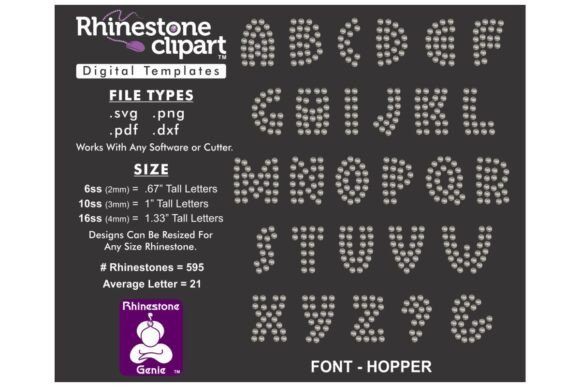
The first critical distinction to make regarding Rhinestone Design FONT - HOPPER 1 is that it is a purely digital downloadable file. There are no physical products included in the transaction; the buyer receives a Zip File containing various file formats, specifically DXF, SVG, PNG, and PDF. This format is standard for modern crafting but requires the user to have the necessary hardware and software infrastructure to utilize it effectively.
These files are engineered to be compatible with a wide range of industry-standard tools. The inclusion of multiple formats ensures versatility across different ecosystems. For instance, users of Silhouette, Cricut, or Brother’s ScanNCut machines will find the SVG and DXF files particularly useful for creating cut lines. Meanwhile, designers working within CorelDRAW or Adobe Illustrator can leverage the vector data for more complex manipulations. The presence of SCAL (Sure Cuts A Lot) compatibility further broadens the utility for those using specific vinyl or rhinestone transfer workflows.
Key Features and Technical Specifications
A defining characteristic of Rhinestone Design FONT - HOPPER 1 is its sizing. The design is originally sized for SS10 rhinestones, which measure approximately .13 inches or 3.3mm in diameter. This is a common size for general apparel decoration, offering a balance between visibility and subtlety. However, the vector nature of the file allows for proportional resizing. Users can scale the design up or down to accommodate larger stones like SS16 or smaller options, provided they adjust the dimensions proportionally to maintain the integrity of the letterforms.
It is important to note a significant operational constraint: these letter sets are not typable fonts. They do not install into a computer's font library. Instead, the workflow involves picking and placing individual letters from the design file to construct words or phrases. This "pick-and-place" method offers greater control over kerning and layout compared to a standard font but requires a slightly different approach to text creation. The user must manually arrange each character within their software application, treating them as distinct graphical elements rather than typed text.
Benefits for Custom Apparel Creators
For individuals interested in decorating apparel, shoes, or accessories, Rhinestone Design FONT - HOPPER 1 offers several practical advantages. The primary benefit is the ability to create professional-grade rhinestone transfers without the need for expensive proprietary software. By providing files compatible with popular consumer-grade cutters, it lowers the barrier to entry for high-quality embellishment.
The multi-format delivery system is another strong point. Having DXF, SVG, PNG, and PDF files in one package means the user is not locked into a single machine brand. If a crafter upgrades their equipment or switches software, the asset remains usable. This flexibility is crucial for businesses that may invest in new technology over time. Furthermore, the ability to resize the design allows for customization based on the specific aesthetic needs of a project, whether it is a bold statement on a denim jacket or a delicate accent on a child's t-shirt.
Tradeoffs and Considerations
While the utility of this design file is clear, there are tradeoffs that potential buyers should weigh. The most notable consideration is the learning curve associated with the "pick-and-place" workflow. Users accustomed to typing text in Word or Photoshop may find the manual arrangement of individual characters tedious, especially for long sentences. This method requires patience and a steady hand within the design software to ensure consistent spacing and alignment.
Additionally, the success of the final product depends heavily on the user's machine calibration. As noted in the usage instructions, not all cutters are identical. Even if the file is resized proportionally, the physical output—specifically the holes cut for the rhinestones—may require adjustment. A machine that cuts too tightly might leave insufficient room for the stone, while a loose cut could result in poor adhesion. Users must be prepared to test the file on scrap material and potentially tweak the size settings in their software to achieve the perfect fit for their specific hardware.
Situations Where This Design Fits Best
Rhinestone Design FONT - HOPPER 1 is an excellent fit for several specific scenarios:
- Small Batch Production: For boutique sellers or Etsy shop owners producing limited quantities of customized items, this file offers a cost-effective way to add value without investing in industrial machinery.
- Customized Gifts: Hobbyists looking to create personalized gifts, such as nameplates on water bottles or initials on tote bags, will find the pick-and-place method ideal for short, impactful text.
- Multi-Machine Households: Families or studios that own both Cricut and Silhouette machines benefit from the diverse file formats, ensuring the design works regardless of which device is available at the moment.
- Design Flexibility Needs: Projects requiring non-standard letter spacing, curved text layouts, or unique artistic arrangements often benefit from the manual control offered by vector letter files rather than rigid typographic fonts.
When Alternatives May Be Preferable
Despite its strengths, there are situations where Rhinestone Design FONT - HOPPER 1 might not be the optimal choice. If a user needs to generate large volumes of text frequently, such as printing team jerseys with full names and numbers, the manual placement process could become inefficient. In these cases, a dedicated rhinestone font that installs directly into the operating system or specialized rhinestone setting software with auto-spacing features might save significant time.
Furthermore, beginners who lack experience with vector graphics software may find the import and manipulation process daunting. If a user is unfamiliar with concepts like DPI, vector paths, or layer management, they might struggle to get the best results from the DXF or SVG files. For absolute novices, pre-made heat transfer sheets or simpler sticker-style rhinestone kits might offer a more straightforward, albeit less customizable, solution.
Practical Decision-Making Insights
Before deciding to acquire Rhinestone Design FONT - HOPPER 1, prospective users should evaluate their current workflow. Ask yourself if you possess the necessary software to open DXF or SVG files. If your only tool is a basic image editor, this file may not be immediately usable without upgrading your software stack. Additionally, consider the complexity of the text you intend to create. Short phrases and logos are well-suited to this format, whereas paragraphs of text may prove frustrating to assemble manually.
Finally, factor in the testing phase. Because machine tolerances vary, plan to allocate time for trial runs. Download the file, unzip it, and import it into your preferred application to verify compatibility before committing to a large production run. By understanding the technical requirements and the manual nature of the design process, you can determine if this digital asset aligns with your creative goals and technical capabilities. When used correctly, it serves as a powerful tool for adding professional flair to custom projects.