Testimonial Infographic Presentation: Elevate Your Story
In the crowded landscape of digital communication, a standard slide deck often fails to capture attention. We have all sat through presentations where data was buried under walls of text or where customer feedback felt disconnected from the visual narrative. This is where the Testimonial Infographic Presentation changes the game. It is not merely a collection of slides; it is a strategic design asset that transforms raw customer feedback into compelling visual stories. By integrating infographic elements with testimonial layouts, this tool bridges the gap between data-driven marketing and emotional storytelling, ensuring your message resonates deeply with your audience.
The Visual Personality of Modern Testimonial Design
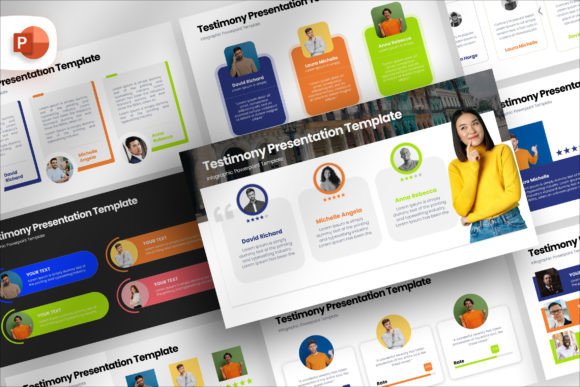
The appeal of the Testimonial Infographic Presentation Template lies in its ability to balance structure with creativity. Unlike rigid corporate templates, this design system embraces a modern aesthetic that feels fresh yet professional. The visual characteristics are defined by clean lines, dynamic shapes, and a thoughtful use of white space that guides the viewer's eye naturally across the slide. When you look at the 72 unique slides included in the package, you will notice a distinct personality that avoids the generic look of stock PowerPoint files.
This template excels in creating a strong visual hierarchy. In any presentation, the most critical element—usually the quote or the key metric—needs to pop. The design utilizes size, color contrast, and positioning to ensure that the testimonial takes center stage. Whether you are using a bold sans serif font for impact or a subtle serif font for elegance, the layout supports your typographic choices without fighting them. The result is a polished look that signals professionalism and attention to detail, traits that are essential for building trust with potential clients.
For designers and marketers, the flexibility of this template is a standout feature. The drag-and-drop picture placeholders are not just static boxes; they include auto-adjustment features for size, transparency, and shape. This means you can integrate high-resolution photography or custom graphics seamlessly. If you are working on a project involving brand identity, the ability to easily modify shape colors, sizes, and positions ensures that every slide aligns perfectly with your brand guidelines. You are not forced to compromise your vision to fit a pre-made mold.
Strategic Applications Across Industries
The versatility of the Testimonial Infographic Presentation makes it suitable for a wide range of creative and commercial projects. For entrepreneurs pitching to investors, these slides provide a structured way to showcase social proof, turning vague claims into concrete evidence. In the realm of editorial design, the layout principles used here can be adapted for annual reports or case study documents, maintaining consistency across different media formats.
Consider the needs of a small business owner or a blogger. They often lack the time to hire a dedicated graphic designer for every campaign. This template acts as a force multiplier. You can quickly assemble a pitch deck, a sales presentation, or a webinar background that looks like it came from a top-tier agency. The included mockup devices allow you to visualize how your content will appear on smartphones, tablets, and desktops. Simply drag and drop your screen placeholder, and you instantly see how your web design or app interface pairs with your customer testimonials.
In the world of packaging design and product launches, the visual language of infographics helps explain complex benefits quickly. While this is primarily a presentation tool, the assets and layout logic can inspire print materials. The clean, modular nature of the slides translates well to brochures, one-pagers, and even social media graphics. The 16:9 aspect ratio ensures that your content is optimized for modern screens, which is crucial for digital-first marketing strategies.
Enhancing Readability and Audience Engagement
One of the primary challenges in presenting testimonials is readability. Long quotes can overwhelm an audience, while short ones might lack context. The Testimonial Infographic Presentation solves this by breaking down information into digestible chunks. The layout encourages the use of bullet points, icons, and highlighted keywords, making the content scannable. This approach respects the audience's time and cognitive load, keeping them engaged throughout the presentation.
Typography plays a pivotal role here. The document includes fonts in a dedicated folder with a free license, giving you immediate access to typefaces that complement the design. When choosing a font, consider the tone of your message. A handwritten font might add a personal touch to a heartfelt story, whereas a geometric display font could emphasize a statistic about growth. The template allows you to experiment with font pairing to create a dynamic contrast between headings and body text, further enhancing visual interest.
Engagement is also driven by the perception of quality. Audiences subconsciously judge the credibility of a business based on the polish of its materials. A sloppy slide deck suggests a sloppy company. Conversely, a presentation built with the Testimonial Infographic Presentation Template communicates competence and care. The consistent use of design elements creates a cohesive narrative, reinforcing your brand's recognition and authority in your niche.
Practical Guidance for Customization and Implementation
To get the most out of this resource, start by evaluating your specific project needs. Do you need to highlight a single powerful quote, or do you need to aggregate multiple reviews? The 72 unique slides offer variations for both scenarios. Begin by importing your images and text into the drag-and-drop placeholders. Take advantage of the auto-adjustment features to ensure your visuals are crisp and properly framed.
When customizing colors, stick to your brand palette but don't be afraid to use accent colors to draw attention to key data points. The fully editable shapes make this process intuitive. You can change the opacity of a background element to make text more legible or resize a circle to frame a client photo perfectly. Remember that less is often more; let the whitespace work for you to create a sense of luxury and clarity.
Regarding licensing, the package comes with a clear documentation file outlining the terms. The fonts included are available under a free license, which is excellent for personal and commercial use within your projects. However, note that image stocks are not included. This is a common practice in premium design assets, allowing you to source high-quality, royalty-free images that specifically match your brand's voice. Always review the included styles and test your creative font choices on different backgrounds to ensure maximum readability before finalizing your presentation.
Ultimately, the Testimonial Infographic Presentation is more than a template; it is a workflow enhancer. It saves you hours of manual formatting and design tweaking, allowing you to focus on what truly matters: crafting a persuasive message. Whether you are a seasoned designer looking for a quick starting point or a marketer needing to elevate your next pitch, this tool provides the foundation for a standout presentation. By combining robust design principles with user-friendly editing capabilities, it ensures that your customer stories shine in every presentation you deliver.