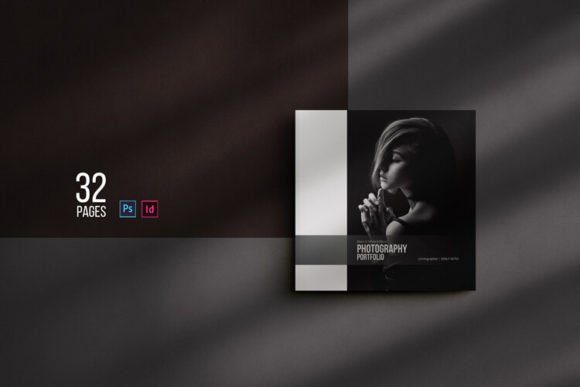
SQUARE - Photography Portfolio Template: A Practical Review
In the competitive landscape of visual arts and creative services, the presentation of work often matters as much as the work itself. For photographers, product designers, and visual storytellers, a portfolio is not merely a collection of images; it is a strategic tool for client acquisition and brand establishment. The SQUARE - Photography Portfolio Template addresses this need by offering a structured, editable framework designed to streamline the creation of professional-grade presentations. Whether intended for physical print or digital distribution as a PDF, this template aims to reduce the technical overhead of layout design while maintaining high aesthetic standards.
The core value proposition of the SQUARE template lies in its adaptability. It is built to function across two major industry-standard platforms: Adobe Photoshop and Adobe InDesign. This dual compatibility ensures that users can choose their preferred workflow without compromising on output quality. By providing a robust foundation, the template allows creatives to focus on curating their best work rather than wrestling with grid systems, typography settings, and page numbering logic from scratch.
Technical Specifications and File Structure
Understanding the technical backbone of any design asset is crucial for determining its fit within an existing workflow. The SQUARE - Photography Portfolio Template is engineered with specific file types to cater to different versions of Adobe software. For Photoshop users, the package includes a .PSD file compatible with versions ranging from CS3 through CC. This backward compatibility is significant, as it accommodates professionals who may be working on older hardware or specific legacy projects.
For those utilizing the more robust typographic and multi-page management features of InDesign, the template provides both an .Indd file for InDesign CC 2019 and an .Idml file for versions CS4 and later. The inclusion of the IDML format is particularly noteworthy, as it acts as a universal bridge, ensuring that the document remains editable even if the user's software version differs from the creator's. This attention to version control reduces the friction often associated with importing third-party templates.
The layout is defined by a square paper size of 210 mm x 210 mm. While standard portrait or landscape orientations dominate many portfolios, the square format offers a distinct, modern aesthetic that can help a photographer stand out. It forces a disciplined approach to composition, as every image must adhere to the same geometric constraints, creating a cohesive visual rhythm throughout the 32-page document. The template is print-ready, featuring proper bleed settings and color profiles, which eliminates the guesswork during the pre-press phase.
Workflow Efficiency and Usability
One of the primary reasons professionals seek templates is to accelerate production time. The SQUARE - Photography Portfolio Template excels in this regard through its use of Smart Objects in the Photoshop version. This feature allows users to simply drop their own images into designated layers, where they automatically resize and adjust to fit the layout masks. There is no need to manually crop or transform images to match the frame, a process that can consume hours when dealing with dozens of photos.
Furthermore, the template separates images, text, and background elements onto distinct layers. This organizational clarity is essential for making quick edits. If a client requests a change in color scheme, the user can modify the global color settings in one location rather than hunting through individual pages. Similarly, text layers are fully editable, allowing for seamless updates to captions, artist statements, or contact information. The automatic page numbering feature in the InDesign version further enhances efficiency, ensuring that pagination remains accurate even if pages are added or removed.
The typography included in the design utilizes free fonts, with download links provided directly within the package. This approach removes licensing barriers and ensures that the final output renders correctly regardless of the user's local font library. From a practical standpoint, this means the template is "plug-and-play" ready, requiring minimal setup before the actual content creation begins.
Design Philosophy and Visual Impact
The design language of the SQUARE - Photography Portfolio Template is characterized by simplicity and uniqueness. In an era where minimalist design often dominates, this template avoids unnecessary ornamentation, placing the images front and center. The clean layout ensures that the viewer's attention is directed immediately to the photography or products being showcased. This restraint is a strength, as it prevents the design from competing with the content.
The square format inherently creates a sense of balance and stability. When printed, a 210mm x 210mm book has a substantial feel, commanding respect on a desk or in a client's hands. Digitally, this aspect ratio translates well to tablet viewing and email attachments, maintaining readability without excessive scrolling. The consistent spacing and alignment across all 32 pages create a professional polish that signals competence and attention to detail to potential clients.
However, the rigid structure of the square layout does require some consideration regarding image selection. Photographers with exclusively vertical or horizontal compositions may find themselves needing to crop their work significantly to fit the square frames. While the Smart Object technology handles the resizing, the artistic decision of how to crop remains with the user. This is not a flaw of the template but rather a characteristic of the chosen format that requires active engagement from the designer.
Versatility Beyond Photography
While marketed primarily as a photography portfolio, the SQUARE - Photography Portfolio Template possesses a multipurpose nature that extends its utility. The neutral layout makes it equally suitable for presenting architectural projects, interior design concepts, fashion collections, or even product catalogs for small businesses. Any scenario where high-quality imagery needs to take precedence over dense text benefits from this structure.
Entrepreneurs and freelancers can utilize this template to create a tangible sales tool. A printed portfolio left with a potential client often leaves a stronger impression than a website link. Additionally, the ability to export the final result as a professional online PDF makes it ideal for email attachments, ensuring that the presentation looks identical on the recipient's screen as it did on the creator's desktop. This consistency is vital for maintaining brand integrity across different mediums.
Real-World Application and Limitations
In real-world scenarios, the template proves most effective for mid-to-high-volume projects where consistency is key. For example, a wedding photographer compiling a seasonal showcase or a commercial photographer pitching to a new agency can leverage the pre-built structure to produce a polished deck in a fraction of the usual time. The separation of layers allows for rapid iteration based on client feedback, a common requirement in freelance workflows.
There are, however, limitations to consider. Users who require highly complex, magazine-style layouts with intricate text wrapping or custom graphical elements may find the template too restrictive. The fixed square size, while aesthetically pleasing, may not align with specific printer requirements or branding guidelines that mandate a different aspect ratio. Additionally, while the template is print-ready, users should always verify the specific CMYK profiles required by their chosen printing service, as default settings may vary slightly depending on the region.
Who Should Use This Template?
The SQUARE - Photography Portfolio Template is ideally suited for professionals aged 20 to 50 who value efficiency without sacrificing quality. This includes:
- Freelance Photographers: Those needing a quick turnaround for client meetings or gallery submissions.
- Creative Entrepreneurs: Small business owners showcasing products or services visually.
- Students and Educators: Individuals preparing thesis projects or course portfolios who need a reliable, cost-effective solution.
- Marketing Professionals: Marketers looking to create visual case studies or lookbooks for campaigns.
It is less suitable for absolute beginners who lack familiarity with Adobe Creative Cloud tools, as navigating PSD or INDD files still requires a baseline understanding of layer management and file handling. However, for anyone with basic proficiency, the learning curve is negligible due to the intuitive organization of the assets.
Long-Term Value and Conclusion
Investing in a high-quality template like SQUARE - Photography Portfolio Template offers long-term value by establishing a reusable system. Once a user understands the mechanics of the Smart Objects and master pages, they can replicate the process for future projects, adapting the style while retaining the structural integrity. The availability of help files for both Photoshop and InDesign ensures that support is readily available should technical hurdles arise.
Ultimately, this template serves as a bridge between raw creativity and professional presentation. It removes the technical friction of layout design, allowing creators to concentrate on what they do best: capturing and curating compelling visuals. For professionals seeking a clean, unique, and versatile way to present their work—whether in print or digital formats—the SQUARE template provides a reliable, efficient, and aesthetically sound solution. Its flexibility, combined with robust technical specifications, makes it a worthwhile asset for any serious visual practitioner looking to elevate their portfolio game.